


Overview
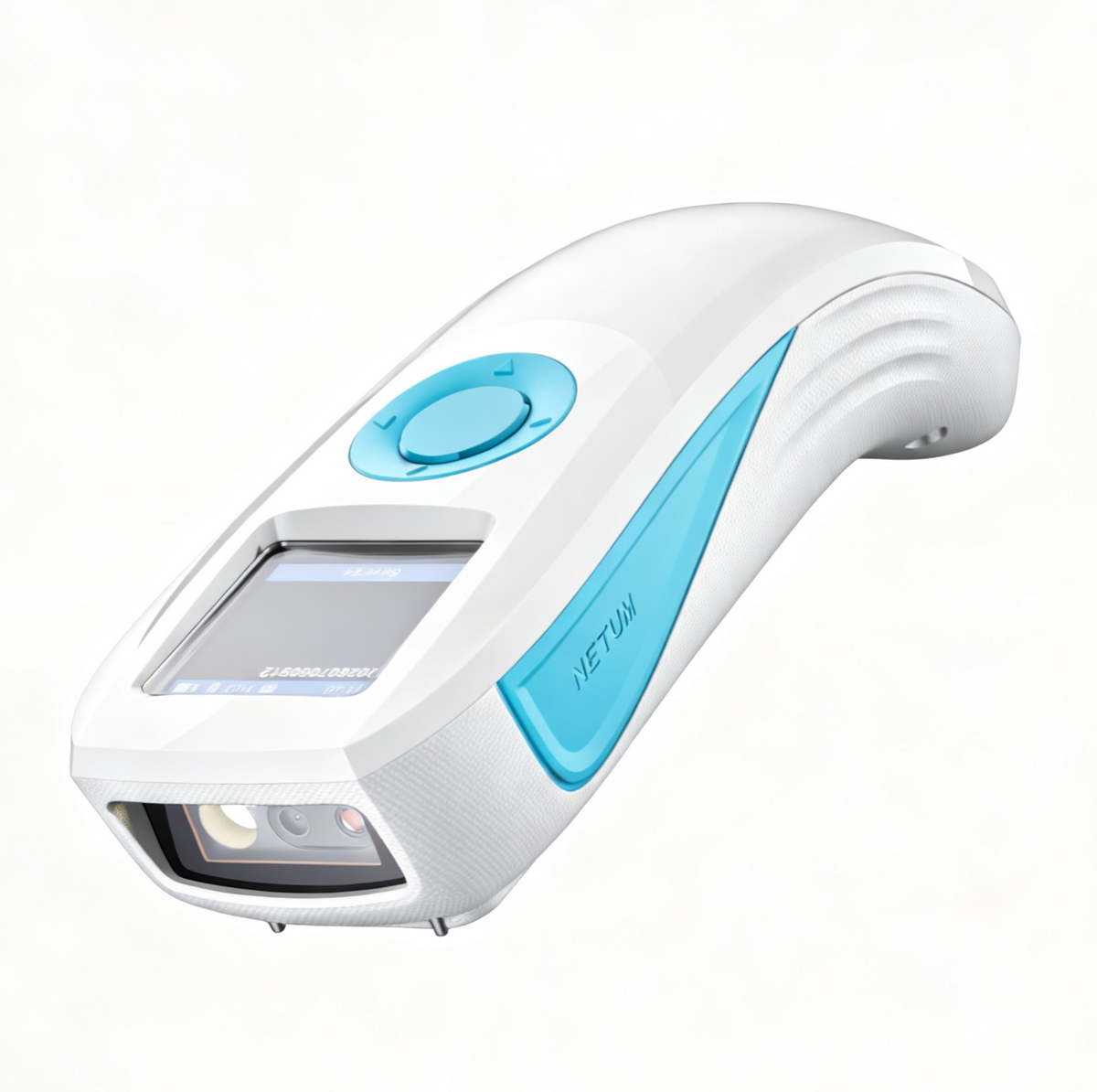
NETUM Mini Wireless 2D Barcode Scanner | Wi-Fi Wireless & Bluetooth -CS8915
- Smart TFT Color Display: Eliminate "blind scanning" with the built-in 1.3-inch TFT color screen. View scanned barcode data, battery level, connection mode, stored barcode count, time, and device settings directly on the scanner for faster verification and easier field operation.
- Wi-Fi Wireless Network Mode - NETUM CS8915 can connect with Wi-Fi TCP, UDP and other network protocols, able totransfer Internet MQTT/HTTP protocol, Support the cloud server data transmission. Bluetooth Mode - can be directly applied to Android, iOS, Windows, Mac OS system equipment, Support HID, BLE and SPP (secondary development) modes data transmission.
- High-Resolution Scanning: NETUM CS8915 Barcode Scanner is equiped with advanced 1280 × 800V pixels(1M) CMOS sensor. With high-speed global exposure, it can read all kinds of small barcodes smoothly, precise barcode scanning, It can be widely used in electronics manufacturing, photovoltaic, new energy, medical and inspection equipment, intelligent manufacturing.
- Rugged, Ergonomic & Flexible: Built with durable TPU and ABS housing and designed to withstand multiple drops from up to 2m onto concrete. The curved silicone grip and soft scan button improve comfort during extended use, while Manual Trigger, Continuous, Auto-Sensing, and Command Trigger modes adapt to different scanning workflows.
- 2000mAh Battery & Offline Storage: The built-in 2000mAh rechargeable battery supports extended high-volume scanning throughout the day, while offline batch storage lets you collect barcode data without a constant connection. Check the stored barcode count directly on the display—ideal for inventory counting, warehouse operations, field delivery, and mobile inspection.
Technical Specifications
1. Optical Performance
1.1 Image sensor 1280 × 800 CMOS
1.2 Illumination White LED
1.3 Aiming Rectangular crosshair laser aiming
1.5 Frame rate 120 fps
1.6 Field of view Horizontal: 42°; vertical: 28°
1.7 Scan angles Roll: 360°; pitch: ±55°; skew: ±55°
1.8 Minimum resolution 1D: ≥3 mil; 2D: ≥7 mil
1.9 Print contrast ≥25% (UPC/EAN 100%, PCS 90%)
2. Symbology Support
Category Supported Symbologies
2D Barcodes: QR / Micro QR, Data Matrix, PDF417 / Micro PDF417, MaxiCode, Aztec.
1D Barcodes: EAN, UPC, Code 39, Code 32, Code 93, Code 128, UCC/EAN 128, Codabar,
Interleaved 2 of 5, ITF-6, ITF-14, ISBN, ISSN, MSI-Plessey, GS1 DataBar, Code 11,
Industrial 25, Standard 25, Plessey, Matrix 2 of 5, Febraban.
3. Typical Reading Range
Symbology Typical Reading Range
Code 128 (5 mil, 10 bytes): 40-215 mm
Code 39 (13 mil, 9 bytes): 75-440 mm
EAN-13 (13 mil): 40-400 mm
QR (15 mil, 40 bytes): 20-250 mm
Data Matrix (15 mil, 50 bytes): 30-280 mm
4. Wireless & Battery
Item Specification
4.1 Connectivity Wired, 2.4 GHz Wireless, Bluetooth (Bluetooth 2.0 / 3.0 / 4.0 / 4.2)
4.2 2.4 GHz Wireless Range Up to 65 m (line of sight)
4.3 Bluetooth Range Up to 20 m (line of sight)
4.4 Battery Capacity 2000 mAh Rechargeable Lithium Battery
4.5 Charging Time Approx. 5 hours
4.6 Standby Mode Automatically enters standby mode after 3 minutes of inactivity
4.7 Charging Input DC 5V / 1–2A, USB Type-C
5. Display
Item Specification
5.1 Display Type TFT LCD Color Display
5.2 Display Size 1.3 inches
5.3 Display Resolution 240(H) RGB × 240(V)
5.4 Display Information Scanned barcode data, device status (battery level / connection mode), time, and system settings menu
6. Electrical Characteristics
Item Specification
6.1 Operating Voltage DC 5V ±5%
6.2 Standby Current 0.6 μA
6.3 Operating Current 170 mA ±5% (Typical); 260 mA ±5% (Maximum)
7. Functional Specifications
Item Specification
7.1 Supported Interface Standard USB
7.2 Communication Protocols 2.4 GHz, USB HID (USB COM), Bluetooth (HID / SPP / BLE)
7.3 Indicators Buzzer, Vibration Motor, Display
7.4 Scanning Modes Manual Trigger*, Continuous Scan, Auto-Sensing, Command Trigger
7.5 Local Storage Supports offline batch storage of scanned data; stored barcode count can be viewed directly on the display
8. Physical Specifications
Item Specification
8.1 Dimensions 137 mm (L) × 50 mm (W) × 38 mm (H)
8.2 Weight Approx. 145 g
8.3 Housing Material Soft Rubber: TPU; Hard Plastic: ABS
8.4 Available Colors Black / Yellow
8.5 Cable USB Type-C Data Cable, 1.2 m