Saltar al contenido del producto
1 de 5

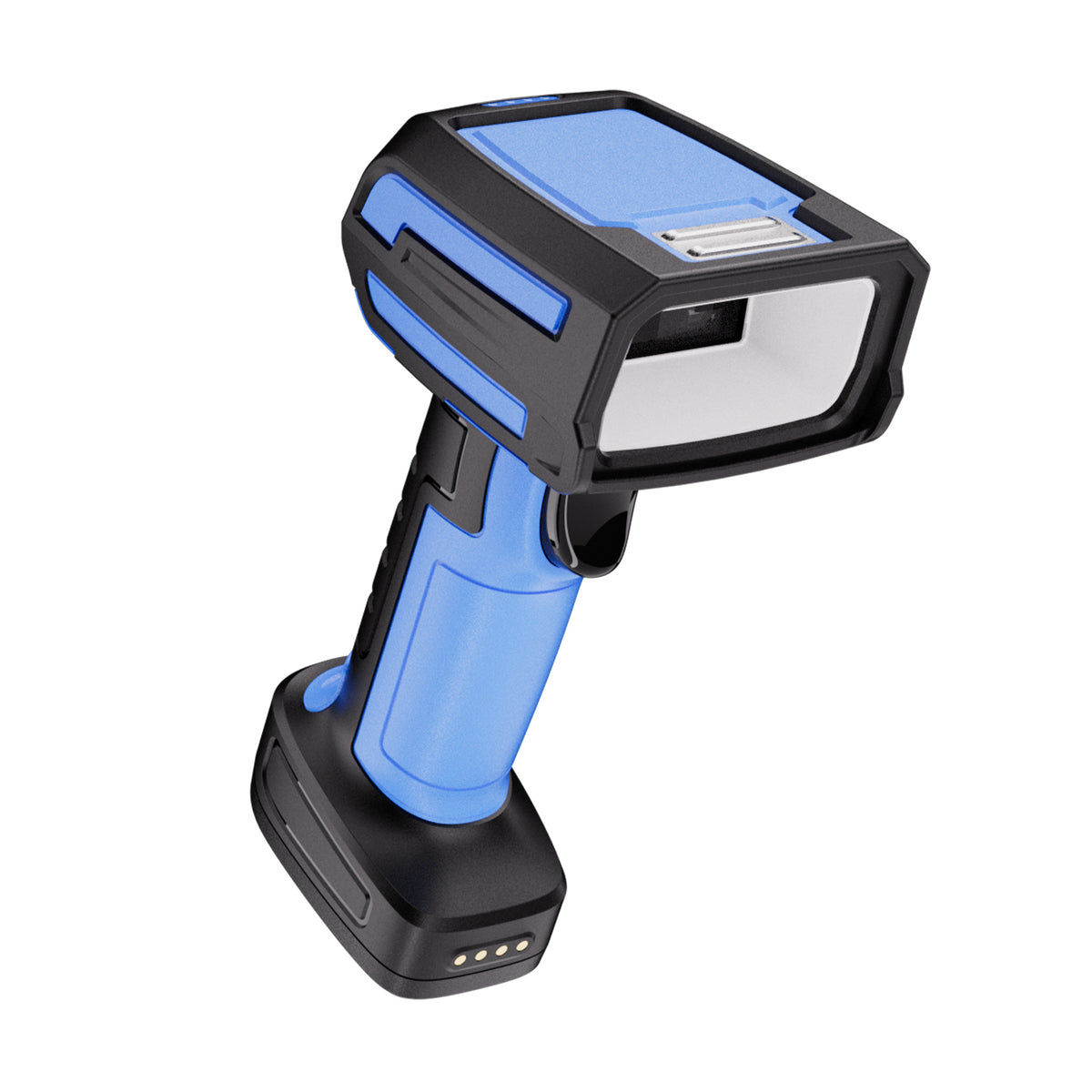
GY-20U Industrial 2D Barcode Scanner

Model
Precio regular $199.00 USD
Precio de oferta $199.00 USD Precio regular
Envío calculado al finalizar la compra.
$159.20

Buy at discounted prices

Minimum Qty Maximum Qty Discount
2 4 10% off
5 9 12% off
10 49 15% off
50 99 17% off
100 + 20% off

Small Batch Purchasing

We support small-batch purchasing, with flexible minimums starting from 5–10 units depending on the product. Pricing varies based on order quantity and the collaboration model. Please feel free to contact us for a quote.

Delivery and Shipping

Order Processing

Orders are typically processed within 1–3 business days.

Shipping Options

We offer two shipping methods: Standard Shipping and Expedited Shipping.

Small-batch orders are shipped by Expedited Shipping by default.

If an item is temporarily out of stock, production will be arranged immediately. Estimated shipping time is 1–10 days.

For full details, please review our Shipping Policy or contact us at any time.

30 Days Returns

If you’re not completely satisfied with your purchase from NETUM, you can return it for a replacement, exchange, or refund at any time within 30 days of purchase.
Read our return policy here.

Warranty

1 year warranty. No matter where you purchase it, we provide 24/7 customer support.

Overview

Model GY-20U
Name: Industry's Longest Scanning Range Barcode Scanner
Resolution: 1280 (H) × 1080 (V) 
Illumination: White light (IEC 62471 compliant)
Focus: Red crosshair aiming
Precision:   [1D Barcodes: 3 mil],  [2D Codes: 5 mil]  
Depth of Field: QR Code 40 mil (25 mm to 600 mm)
Communication: 2.4G, Bluetooth, Serial Port

Product Advantages: Balanced Performance
1. Excellent scanning capability for barcodes with small size, low contrast, damage, distortion, and other challenging printing conditions.  
2. Short minimum scanning distance with a relatively long depth of field.  
3. Capable of reading standard DPM (Direct Part Marking) codes.  

**Note:**  
- Not suitable for long-range scanning.  
- Cannot read complex DPM codes.  


Features of the Ultra-Rugged Industrial Barcode Scanner

  • Drop Resistance: Designed to withstand drops from significant heights (e.g., 1.5 meters or higher).
  • Dustproof and Waterproof: Engineered to resist intrusion from dust, liquids, and other elements in harsh environments.
  • High-Precision Scanning: Capable of accurately reading barcodes even if they are blurry, damaged, or poorly printed.
  • Extended Battery Life: Supports prolonged continuous operation, ideal for demanding workflows requiring uninterrupted use.
  • Versatile Connectivity: Compatible with multiple connection types such as USB, RS232, and keyboard emulation, ensuring integration with various devices like computers, POS systems, and embedded systems.
  • Interference and Environmental Resistance: Operates reliably in environments with strong electromagnetic interference or extreme conditions such as high/low temperatures and high humidity.
  • Ergonomic Design: Designed with an ergonomic handle for comfortable prolonged use, reducing hand fatigue.

Application Scenarios

  • Production Lines and Manufacturing: Material and component management.
  • Warehouse and Inventory Management: Inventory counting, inbound, and outbound management.
  • Logistics and Supply Chain: Cargo tracking and loading/unloading management.
  • Healthcare and Pharmaceutical Management: Anti-counterfeiting traceability and certification tracking.
  • Industry 4.0 and Smart Manufacturing: Real-time production data collection and system integration.
  • Automotive and Parts Management: Scanning barcodes on parts to ensure accurate matching and assembly.
  • Environmental and Safety Management: Labeling and tracing hazardous materials.

Innovative Features

Advanced Acoustic Design

  • Optimized for industrial environments, ensuring audible alerts in noisy settings.

Detachable Data Cable

  • Compatible with various industrial interfaces; cables can be easily swapped for direct connection.

High-Durability Trigger Design

  • Button lifespan exceeds 5 million presses, ensuring industrial-grade reliability and stability.

Impact-Resistant Mainboard

  • Silicone cushioning on both sides of the mainboard minimizes damage caused by hard impacts.

Enhanced Optical Depth and Body Structure

  • Upgraded for better scanning performance and durability.

Large Indicator Light Design

  • Allows users to easily identify the scanner’s status at a glance.

Power and Charging Innovations

Industrial Lithium Battery Design

  1. 3000mAh High Capacity: Supports extended industrial use.
  2. Removable Battery: Enables quick replacement to ensure continuous operation when the battery is depleted.

Charging Dock with Status Indicators

  • Orange Light On: Serial port mode active.
  • No Light: USB mode active.
  • Switching Modes: Long press the button for 3 seconds to toggle between serial port and USB modes.

Charging Pins

  • Four contact points ensure stable charging without interruptions.

Dual Output Design

  • USB and Serial Output: Accommodates diverse industrial scenarios.
  • Cable Specs:
    • Length: 2 meters
    • Thickness: 5mm
    • Interfaces: USB, RS232

Additional Status Indicators

Dock Button Light

  • Green Light On: Battery fully charged.
  • Green Light Flashing: Battery charging in progress.
  • Pairing Mode: Long press the button for 3 seconds to pair the scanner with the dock.

Battery Level Indicator (Red LED)

  • 4 LEDs On ≈ Full battery.
  • 3 LEDs On ≈ 75% battery.
  • 2 LEDs On ≈ 50% battery.
  • 1 LED On ≈ 25% battery.

GY-20U Barcode scanner specifications

See what this scanner can do.

Explore the performance, connectivity, power, and durability details that matter when choosing a scanner for your workflow.

Model
GY-20U
Decode Capabilities
1D/2D
Scan Engine Technology
CMOS
Sensor Resolution
1280 (H) × 1080 (V)
Illumination
Illumination (Whitelight): IEC 62471 Crosshair aimer (Red)
Aiming System
Crosshair aimer (Red)
Acquisition Rate
Up to 120 frames/s
Motion Tolerance
6 m/s [19.7 ft/ s]
Minimum Element Resolution
1D:≥3 mil 2D:≥5 mil
Minimum Print Contrast
≥20%(UPC/EAN 100%, PCS 90%)
Field of View
Horizontal: 43°(H), Vertical: 36°(V)
Pitch / Skew / Roll Tolerance
Horizontal: 43°(H), Vertical: 36°(V) Pitch: 360°, Skew: ±60°, Pitch: ±60°
View all specifications Show fewer specifications
Depth of Field
QR (5 mil) 40 mm~100 mm Code39(3 mil) 35 mm~140 mm Code39(5 mil) 35 mm~190 mm EAN(13 mil) 50 mm~330 mm
Supported Symbologies
1D: UPC A, UPC E, EAN 8, EAN 13, Code 128, Code 39, Code 93, Code 32, Code11, Codabar, Plessey, MSI, Interleaved 2 of 5 IATA 2 of 5, Matrix 2 of 5, Straight 2 of 5, Pharmacode, GS1 DataBar 14, GS1 DataBar Expanded, GS1 DataBar Limited, Composite Code A, Composite Code B, Composite Code C 2D: Data Matrix, QR Code, Micro QR, PDF417, Micro PDF417, Aztec, MaxiCode, Han Xin Code
Trigger Modes
Manual trigger, Continuous mode, Presentation mode, Host-command trigger
Connectivity
Wired, Wireless, 2.4 GHz, Bluetooth 2.4 GHz wireless+Bluetooth (supported versions 2.0, 3.0, 4.0, 4.2) USB HID (USB COM), RS232serial port, Bluetooth (HID, SPP, BLE)
Host Interfaces
USB, RS232 Standard USB interface, RS232serial port
Wireless Range
2.4 GHz: 300 m (with AP extended-range transmission) Bluetooth: 20 m
Batch Memory Capacity
64kb~2M
Battery Capacity
3200 mAh (Standardtwo batteries)
Operating Time
3 minutes to enter standby
Standby Timeout
3 minutes to enter standby
Charge Time
Approx. 5 hours 5V 1~2A
Operating Voltage
5V±5% 300 mA ±5% (Typical),500 mA ±5% (Maximum) 0.6μA
Dimensions (L × W × H)
198 × 74 × 105
Weight
Scanner: Approx. 346 g Cradle: Approx. 492 g battery: Approx. 58 g
Enclosure Material
Elastomer: TPU Rigid housing: ABS
Color Options
Black, Blue
Cable Length
Cable length: 2 m, cable gauge: 5 mm, with ferrite core+shielded
Cradle / Stand Included
No
User Feedback
Buzzer, Vibration
Ingress Protection
IP67
Drop Resistance
Withstands a 3 m drop to concrete
Regulatory Approvals
CE, RoHS, FCC

Downloads

Manuals, software, and developer resources selected for this exact model.

8 resources

Android Bluetooth BLE SDK

BLE-capable NETUM barcode scanners
Sdk
Android development package for Bluetooth Low Energy scanner communication.

NETUM Keyboard for Android

BLE-capable NETUM Bluetooth barcode scanners
AppVersion 5.162024-05-05
Android keyboard application for barcode scanners that can operate in Bluetooth BLE mode.

Android Bluetooth SPP SDK

SPP-capable NETUM barcode scanners
Sdk
Android development package for Bluetooth SPP scanner communication.

Bluetooth SDK for Apple iOS

Compatible NETUM Bluetooth barcode scanners
Sdk
iOS development package for supported NETUM Bluetooth scanners.

Will this barcode scanner work with my computer, mobile device, or POS system?

Usually, yes—if the connection interface matches your device or the scanner supports USB HID keyboard mode. Some POS systems only accept approved USB VID/PID values, so they may reject an otherwise compatible HID scanner. Check which type your POS uses, or send us the POS model and software name before ordering.

Which barcodes can it read, and can it scan from a phone or computer screen?

Barcode support varies by model. Devices with a CMOS scanning engine can scan barcodes on a computer screen; otherwise, they cannot.

How do I connect the scanner?

For a wired scanner, connect the USB cable and start scanning—most models are ready to use right away. For a wireless scanner, follow the model’s manual to connect by 2.4G receiver or Bluetooth. Pairing steps can differ between models, so use the correct guide in Downloads.

Can I scan directly into Excel, inventory software, or a POS system?

Yes, in most cases. When the scanner is using HID keyboard mode, scanned data appears wherever the cursor is active, such as in Excel, inventory software, or a POS input field. Workflows that use serial communication, an API, or an SDK may need extra setup. Check the communication modes in the Specifications and any available software or SDK in Downloads.

The scanner beeps, but no data appears—what should I check?

A beep usually means the barcode was read, but the data is not reaching the active field. Click inside a blank field in Notepad, TextEdit, or your POS and scan again. Then check the USB cable, 2.4G receiver, or Bluetooth connection and confirm the correct interface mode. If it still does not work properly, please contact us and provide the scanner model, a description of the problem, and the operating system and application name.

Barcode scanners for your business

Planning a rollout, replacement, or bulk purchase? Share your requirements and we’ll help you choose the right scanner and configuration.

Request a quote

Tell us the model(s), quantity, use case, barcode types, connection or integration needs, customization requirements, and delivery destination. We’ll review the details and recommend a suitable solution.

If you are unsure, tell us what and where you need to scan.

Include your application, barcode types, connection or integration needs, customization requests, and target delivery date.