Skip to product information
1 of 9

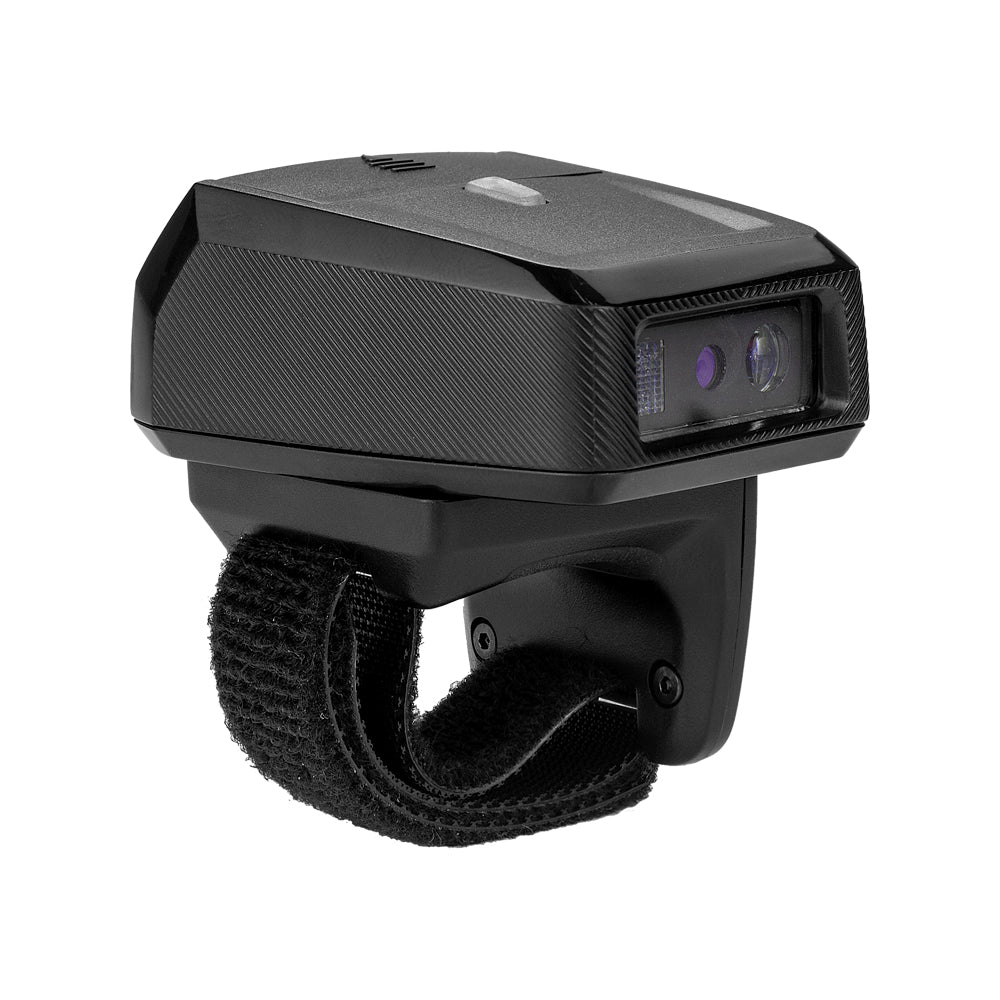
RS-9000BT Wireless 2D Ring Barcode Scanner

Regular price $299.99 USD
Sale price $299.99 USD Regular price $399.99 USD
Shipping calculated at checkout.
$239.99

Buy at discounted prices

Minimum Qty Maximum Qty Discount
2 4 10% off
5 9 12% off
10 49 15% off
50 99 17% off
100 + 20% off

Small Batch Purchasing

We support small-batch purchasing, with flexible minimums starting from 5–10 units depending on the product. Pricing varies based on order quantity and the collaboration model. Please feel free to contact us for a quote.

Delivery and Shipping

Order Processing

Orders are typically processed within 1–3 business days.

Shipping Options

We offer two shipping methods: Standard Shipping and Expedited Shipping.

Small-batch orders are shipped by Expedited Shipping by default.

If an item is temporarily out of stock, production will be arranged immediately. Estimated shipping time is 1–10 days.

For full details, please review our Shipping Policy or contact us at any time.

30 Days Returns

If you’re not completely satisfied with your purchase from NETUM, you can return it for a replacement, exchange, or refund at any time within 30 days of purchase.
Read our return policy here.

Warranty

1 year warranty. No matter where you purchase it, we provide 24/7 customer support.

Overview

RS-9000BT 2D Ring Scanner with Zebra SE4107 1M Pixels 2D Scan Engine

RS-8000BT 2D Ring Scanner with Netum 212R 1M Pixels 2D Scan Engine

Efficient Wireless Scanning Done Right: Combining mobility Bluetooth wireless design and 2D scanning performance in one scanner, the NETUM RS-9000BT scanner delivers the simple way to do the inventory control faster and efficiency for business solutions from warehousing, manufacturing, logistics to general purpose retail scanning.

Strong Decoding Ability: the NETUM RS-9000BT scanner uses new generation Zebra slim 2D imager scan engine, Support main 1D, 2D bar code scanning, such as QR code, Data Matrix, PDF 417 , FedEx, USPS,VIN. Scanning the bar code on different medias, not only printed barcodes, but also barcodes from the screen.

Supports Bluetooth dual mode technology: (Bluetooth LE V4.2 & Bluetooth 2.1+EDR, Class 1) to give you the freedom and bring your business the flexibility. It is compatible with any smartphone, tablet, or computer–the RS-9000BT pairs easily to any mobile device or PC.

Charging Base: This NETUM RS9000 wireless scanner has a cradle accessory that supports auto Bluetooth pairing and it has the ability to switch between trigger or presentation mode automatically. When it is out of range reading in Auto Mode, the scanned data will be saved into the NETUM RS-9000BT memory buffer automatically and transmit to the host when back to the wireless coverage.

Compact but durable: Built for all day use, new ring scanner has 450mAh battery capacity, supporting more than 9 hours work after full charge, NETUM RS-9000BT incorporated with rugged design for protection against dust and moisture. Moreover, the built-in long lifecycle trigger of 10 million times guarantees a continuous productivity for best reliability.

Features:
Compatible With Most Operation System
We can provide the software(Bluetooth input method)for Windows and Android, By the way, there are corresponding SDK

【MATERIAL 】TPU+PC, more rugged than ABS + PC, more stronger fall resistance
【Battery】 New ring scanner has 450mAh battery capacity, supporting more than 9 hours work after full charge, more lasting than the previous generation
【Charging Base】 Charging base not only charge ring scanner but also can be regarded as a Bluetooth adapter to connect ring scanner with PC

Specifications
Dimensions: Length:55.0mm, Width: 39.2mm, Height:51.2mm
Weight: 65grams
Working mode: Bluetooth mode, offline mode and RS232 mode(optional)
Battery power
Internal Battery: Rechargeable 450mAh Li-ion Battery, Standby 30 days.
Charge time: About 2 hours

Barcode Type
1D: EAN, UPC, Code 39,Code 93,Code 128,UCC/EAN 128, Codabar, Interleaved 2 of 5, ITF-6,ITF-14,ISBN,ISSN, MSI-Plessey , GS1 Databar,GS1 Composite Code,Code 11,Industrial 25, Standard 25,Plessey,Matrix 2 of 5; 
2D: QR, Data Matrix, PDF417, Aztec, Maxicode, Hanxin and so on.

Communication: Class 3 Bluetooth HID, SPP, BLE(optional) with 30M distance, RS232 cable(optional)
Barcode scanner charger & Bluetooth adapter(optional)
Weight: 50grams
Power DC: 5V/500mA
Charge current: 250mA
Interface: 1×Type-C(For charge or data transmission):5V DC
Characteristic
1. It can charge both batteries and machines at the same time.
2. The charger can be multiple connected(optional). (In order to ensure charging efficiency, it is recommended that no more than 5 chargers be connected.)
Adapter Working mode: HID keyboard, Virtual Serial Port , RS-232(optional)

RS-9000BT Barcode scanner specifications

See what this scanner can do.

Explore the performance, connectivity, power, and durability details that matter when choosing a scanner for your workflow.

Model
RS-9000BT
Decode Capabilities
1D/2D
Scan Engine Technology
CMOS
Sensor Resolution
1280 x 960 pixels, Rolling shutter
Illumination
Green LED Warm-white LED Maximum 107,639 lux (direct light)
Aiming System
Green LED
Minimum Element Resolution
1D:≥3 mil 2D:≥5 mil
Field of View
Horizontal: 44.5°, Vertical: 33.5°
Pitch / Skew / Roll Tolerance
Skew tolerance: ±60° Pitch tolerance: ±60° Roll tolerance: 360°
Depth of Field
5 mil Code 39 2.4 in/6.1 cm to 9.5 in/24.1 cm 5 mil Code 128 2.8 in/7.1 cm to 9.0 in/22.9 cm 6.67 mil PDF 417 2.4 in/6.1 cm to 8.0 in/20.3 cm 10 mil DataMatrix 2.9 in/7.4 cm to 8.5 in/21.6 cm 100% UPCA 1.8 in/4.6 cm to 19.5 in/49.5 cm 15 mil QR 1.2 in/3.0 cm to 11.5 in/29.2 cm 20 mil QR 1.2 in/3.0 cm to 14.0 in/35.6 cm
Supported Symbologies
2D PDF417, MicroPDF417, Code 128 Emulation, QR Code, MicroQR, Data Matrix, MaxiCode, Aztec 1D Code128 (UCC/EAN-128, GS1-128, ISBT 128), UPC/EAN(UPC-A, UPC-E, EAN-8/JAN-8, EAN-13/JAN-13, ISBN, ISSB EAN), Code39, Code32, Code93, Code11, Interleaved 2 of 5 (ITF), Discrete 2 of 5 (DTF), Codabar (NW-7) MSI, Chinese 2 of 5, Matrix 2 of 5, Korean 3 of 5, Inverse 1D, Postal Codes, GS1 DataBar, Composite
Trigger Modes
wearableManual triggerscanning (presentation mode configurable, Continuous mode)
View all specifications Show fewer specifications
Connectivity
Wireless, Bluetooth Bluetooth 4.2 (supported versions 2.0, 3.0, 4.0, 4.2)
Host Interfaces
Type-C
Wireless Range
Bluetooth: Up to 30 m
Batch Memory Capacity
64kb~2M
Battery Capacity
550 mAh
Operating Time
3 minutes to enter standby
Standby Timeout
3 minutes to enter standby
Charge Time
3-4 hours
Operating Voltage
5 VDC±5%
Dimensions (L × W × H)
ring scanner: 51 × 41 × 50 mm Cradle: 71 × 56 × 39 mm
Weight
ring scannerApprox. 50 g CradleApprox. 54 g
Enclosure Material
ABS+TPR
Color Options
Black+Blue
Cable Length
1.2 m
Cradle / Stand Included
No
User Feedback
Buzzer, LED indicator, Vibration
Operating Temperature
-4° F to 122° F / -20° C to 50° C
Storage Temperature
-22° F to 158° F/-30° C to 70° C
Relative Humidity
5%-90%
Ambient Light Immunity
Maximum 107,639 lux (direct light)

Downloads

Manuals, software, and developer resources selected for this exact model.

8 resources

RS-9000BT User Manual

RS-9000BT
Document
Download the RS-9000BT user manual for setup, configuration, and operating instructions.

NETUM Keyboard for Android

BLE-capable NETUM Bluetooth barcode scanners
AppVersion 5.162024-05-05
Android keyboard application for barcode scanners that can operate in Bluetooth BLE mode.

Android Bluetooth BLE SDK

BLE-capable NETUM barcode scanners
Sdk
Android development package for Bluetooth Low Energy scanner communication.

Android Bluetooth SPP SDK

SPP-capable NETUM barcode scanners
Sdk
Android development package for Bluetooth SPP scanner communication.

Bluetooth SDK for Apple iOS

Compatible NETUM Bluetooth barcode scanners
Sdk
iOS development package for supported NETUM Bluetooth scanners.

Will this barcode scanner work with my computer, mobile device, or POS system?

Usually, yes—if the connection interface matches your device or the scanner supports USB HID keyboard mode. Some POS systems only accept approved USB VID/PID values, so they may reject an otherwise compatible HID scanner. Check which type your POS uses, or send us the POS model and software name before ordering.

Which barcodes can it read, and can it scan from a phone or computer screen?

Barcode support varies by model. Devices with a CMOS scanning engine can scan barcodes on a computer screen; otherwise, they cannot.

How do I connect the scanner?

For a wired scanner, connect the USB cable and start scanning—most models are ready to use right away. For a wireless scanner, follow the model’s manual to connect by 2.4G receiver or Bluetooth. Pairing steps can differ between models, so use the correct guide in Downloads.

Can I scan directly into Excel, inventory software, or a POS system?

Yes, in most cases. When the scanner is using HID keyboard mode, scanned data appears wherever the cursor is active, such as in Excel, inventory software, or a POS input field. Workflows that use serial communication, an API, or an SDK may need extra setup. Check the communication modes in the Specifications and any available software or SDK in Downloads.

The scanner beeps, but no data appears—what should I check?

A beep usually means the barcode was read, but the data is not reaching the active field. Click inside a blank field in Notepad, TextEdit, or your POS and scan again. Then check the USB cable, 2.4G receiver, or Bluetooth connection and confirm the correct interface mode. If it still does not work properly, please contact us and provide the scanner model, a description of the problem, and the operating system and application name.

Barcode scanners for your business

Planning a rollout, replacement, or bulk purchase? Share your requirements and we’ll help you choose the right scanner and configuration.

Request a quote

Tell us the model(s), quantity, use case, barcode types, connection or integration needs, customization requirements, and delivery destination. We’ll review the details and recommend a suitable solution.

If you are unsure, tell us what and where you need to scan.

Include your application, barcode types, connection or integration needs, customization requests, and target delivery date.