Zum Produktinhalt springen

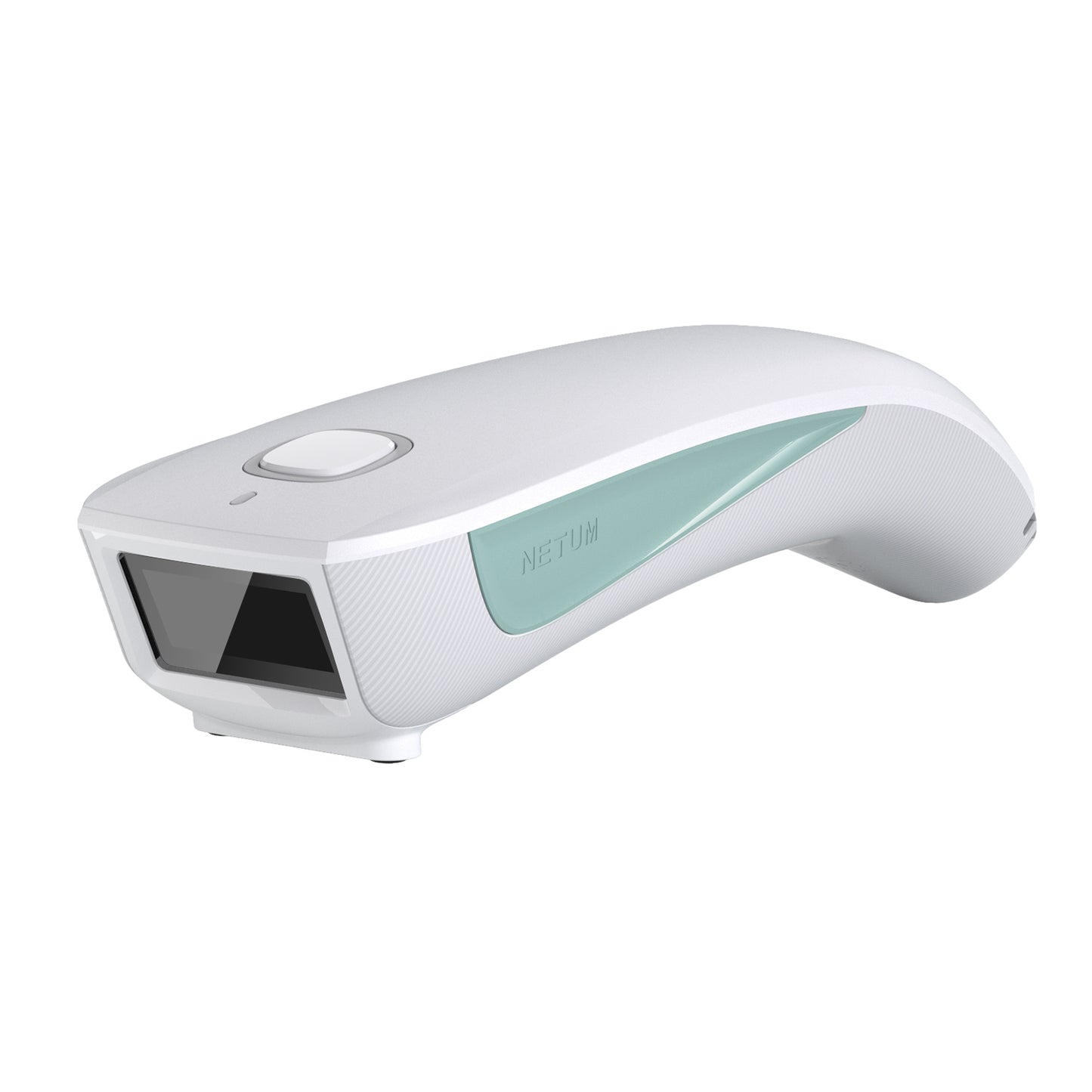
NETUM C200-LF / C300-HF NFC-RFID-Tags-Lesegerät Verbindung über Bluetooth Wireless

Regulärer Preis $49.00 USD
Angebotspreis $49.00 USD Regulärer Preis
Versand wird an der Kasse berechnet.
$39.20

Buy at discounted prices

Minimum Qty Maximum Qty Discount
2 4 10% off
5 9 12% off
10 49 15% off
50 99 17% off
100 + 20% off

Small Batch Purchasing

We support small-batch purchasing, with flexible minimums starting from 5–10 units depending on the product. Pricing varies based on order quantity and the collaboration model. Please feel free to contact us for a quote.

Delivery and Shipping

Order Processing

Orders are typically processed within 1–3 business days.

Shipping Options

We offer two shipping methods: Standard Shipping and Expedited Shipping.

Small-batch orders are shipped by Expedited Shipping by default.

If an item is temporarily out of stock, production will be arranged immediately. Estimated shipping time is 1–10 days.

For full details, please review our Shipping Policy or contact us at any time.

30 Days Returns

If you’re not completely satisfied with your purchase from NETUM, you can return it for a replacement, exchange, or refund at any time within 30 days of purchase.
Read our return policy here.

Warranty

1 year warranty. No matter where you purchase it, we provide 24/7 customer support.

Overview

C200 LF 125 KHz / 134,2 KHz RFID-Leistung

【Unterstützt mehrere Protokolle】 – Der NETUM C200 Mikrochip-Leser unterstützt ISO11784/ISO11785/FDX-B (15-stellige Mikrochips) und EMID, einfach zu bedienen, eine Taste zum Lesen. HINWEIS: Bitte bestätigen Sie vor dem Kauf die Frequenzeffizienz und Übereinstimmung Ihres elektronischen Tags. Das FDX-A-Protokoll wird nicht unterstützt.
【Unterstützt Bluetooth- und USB-Datenübertragung】 Der NETUM Pet Scanner unterstützt den HID-/SPP-/BLE-Modus über Bluetooth. Funktioniert mit Windows, Mac OS, Windows Mobile, Android OS, iOS und Linux. Sie können diese Informationen über ein USB-Kabel auf Ihren Computer hochladen , drahtloses Bluetooth, das Ihnen die Flexibilität bietet, je nach Wunsch zwischen den beiden Optionen zu wechseln.
【Tragbares Design im Taschenformat】 Mit einem Gewicht von weniger als 3 Unzen ist der NETUM C200 Tiermarkenscanner extrem leicht und tragbar, sodass er überall zur perfekten Scanlösung wird. Sie könnten sie nur mit einer Hand halten. tragbar und bequem zu bedienen. Weit verbreitet für die Kleintierhaltung, die Betriebsführung, die Eisenbahninspektion usw.
Der Zweifrequenzmodus unterstützt 134,2 kHz und 125 kHz und erhöht so die Flexibilität und Kompatibilität beim Lesen und Identifizieren von RFID-Tags.
【Eingebauter wiederaufladbarer 1200-mAh-Akku】 - Der Akku muss nicht ausgetauscht werden, ist einfach zu bedienen und kann über die USB-Schnittstelle aufgeladen werden. Der physische Netzschalter spart Energie im Falle einer Fehlbedienung.

C300 HF 13,56 MHz RFID-Leistung
Trägerfrequenz: 13,56 MHz (RFID HF) Lese-/Schreibgeschwindigkeit: 26 kbit/s (ISO 15693), 106 kbit/s (ISO 14443), Antenne: Integriert

Unterstützte HF-RFID-Tags:
IS015693: ICode SL2, LRI512, my-d, Tag-lt HF-I
Proprietär: ICode SLI, PicoTag (kein Antikollision), Tag-lt HFISO/IEC 14443 A- und B-konforme Tags mit allen Varianten (Mifare, Sony FeliCA)Kompatibel mit EPC GEN 2 HF und ISO
NFC:NFCIP-1, ISO/IEC 18092)


Barcode scanner specifications

See what this scanner can do.

Explore the performance, connectivity, power, and durability details that matter when choosing a scanner for your workflow.

Will this barcode scanner work with my computer, mobile device, or POS system?

Usually, yes—if the connection interface matches your device or the scanner supports USB HID keyboard mode. Some POS systems only accept approved USB VID/PID values, so they may reject an otherwise compatible HID scanner. Check which type your POS uses, or send us the POS model and software name before ordering.

Which barcodes can it read, and can it scan from a phone or computer screen?

Barcode support varies by model. Devices with a CMOS scanning engine can scan barcodes on a computer screen; otherwise, they cannot.

How do I connect the scanner?

For a wired scanner, connect the USB cable and start scanning—most models are ready to use right away. For a wireless scanner, follow the model’s manual to connect by 2.4G receiver or Bluetooth. Pairing steps can differ between models, so use the correct guide in Downloads.

Can I scan directly into Excel, inventory software, or a POS system?

Yes, in most cases. When the scanner is using HID keyboard mode, scanned data appears wherever the cursor is active, such as in Excel, inventory software, or a POS input field. Workflows that use serial communication, an API, or an SDK may need extra setup. Check the communication modes in the Specifications and any available software or SDK in Downloads.

The scanner beeps, but no data appears—what should I check?

A beep usually means the barcode was read, but the data is not reaching the active field. Click inside a blank field in Notepad, TextEdit, or your POS and scan again. Then check the USB cable, 2.4G receiver, or Bluetooth connection and confirm the correct interface mode. If it still does not work properly, please contact us and provide the scanner model, a description of the problem, and the operating system and application name.

Barcode scanners for your business

Planning a rollout, replacement, or bulk purchase? Share your requirements and we’ll help you choose the right scanner and configuration.

Request a quote

Tell us the model(s), quantity, use case, barcode types, connection or integration needs, customization requirements, and delivery destination. We’ll review the details and recommend a suitable solution.

If you are unsure, tell us what and where you need to scan.

Include your application, barcode types, connection or integration needs, customization requests, and target delivery date.