Zum Produktinhalt springen
1 von 4

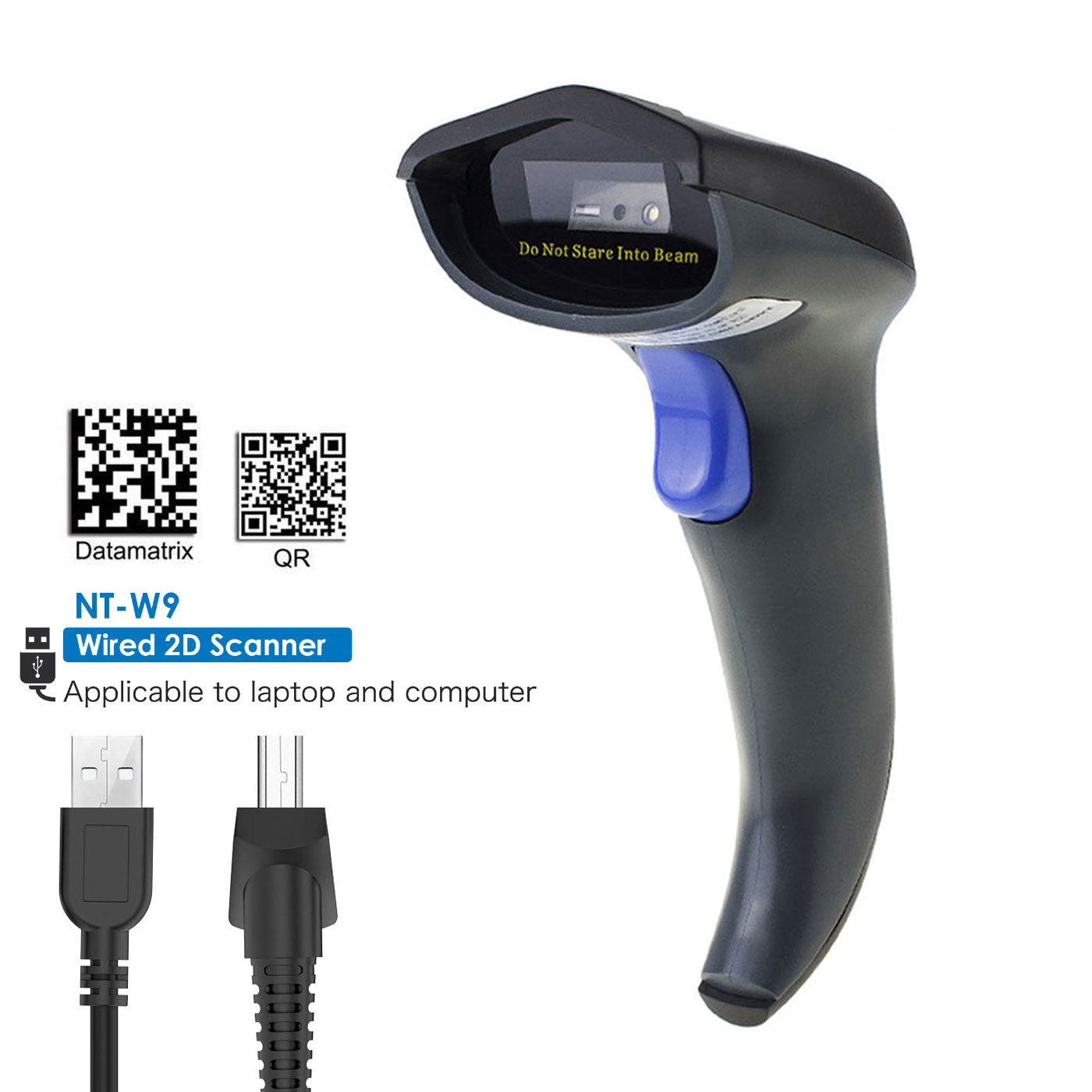
NETUM W9S USB-verkabelter QR-Scanner, 1D- und 2D-Barcodeleser

Regulärer Preis $79.99 USD
Angebotspreis $79.99 USD Regulärer Preis $109.99 USD
Versand wird an der Kasse berechnet.
$63.99

Buy at discounted prices

Minimum Qty Maximum Qty Discount
2 4 10% off
5 9 12% off
10 49 15% off
50 99 17% off
100 + 20% off

Small Batch Purchasing

We support small-batch purchasing, with flexible minimums starting from 5–10 units depending on the product. Pricing varies based on order quantity and the collaboration model. Please feel free to contact us for a quote.

Delivery and Shipping

Order Processing

Orders are typically processed within 1–3 business days.

Shipping Options

We offer two shipping methods: Standard Shipping and Expedited Shipping.

Small-batch orders are shipped by Expedited Shipping by default.

If an item is temporarily out of stock, production will be arranged immediately. Estimated shipping time is 1–10 days.

For full details, please review our Shipping Policy or contact us at any time.

30 Days Returns

If you’re not completely satisfied with your purchase from NETUM, you can return it for a replacement, exchange, or refund at any time within 30 days of purchase.
Read our return policy here.

Warranty

1 year warranty. No matter where you purchase it, we provide 24/7 customer support.

Overview

Warum sollten Sie sich für den kabellosen Barcodescanner von NETUM entscheiden?

1. Schnelle, genaue Lesegeschwindigkeit: 32-Bit-CPU-Super-Decodierungsfähigkeit, die die Geschwindigkeit bis zu 200/Sek. erreichen kann.

2. Stellen Sie 25 verschiedene Sprachen bereit (bitte schreiben Sie an unseren Kundenservice, wenn Sie Anweisungen in Spanisch, Deutsch, Französisch, Italienisch oder Japanisch benötigen. Wir können Ihnen dann ein PDF-Handbuch zur Verfügung stellen).

3. Fügen Sie benutzerdefinierte Präfixe/Suffixe hinzu und löschen Sie Zeichen. Tastaturtasten/-kombinationen hinzufügen (Terminator TAB, CR&LF usw.)

4. Weit verbreitet: Dieser am Griff gehaltene Barcodescanner kann für Geschäfte, Supermärkte, Lagerhäuser, Logistik, Bibliotheken, Krankenhäuser und Lagerhäuser verwendet werden

Wichtiger Hinweis: 
1. Wenn Sie eine US-amerikanische physische Tastatur verwenden, stellen Sie sicher, dass Ihre Fenstersprache US ist. Wenn Sie die deutsche Phaysical-Tastatur verwenden, stellen Sie sicher, dass Ihre Fenstersprache DE ist, da sonst die ausgegebenen Daten falsch sind. 

2. Bevor Sie den Scanner zum Scannen von 2D-Codes mit Sonderzeichen wie ó é á ü ä ß usw. verwenden, müssen Sie den Treiber installieren. Sie können es von unserer offiziellen Website herunterladen oder uns für Hilfe kontaktieren.https://gzxlscan.com/downloads/

Merkmale
1. Einige Arten von Barcodes können von diesem kabelgebundenen 2D-Scanner nicht dekodiert werden, bevor Sie ihn programmieren. In diesem Fall kontaktieren Sie uns bitte, um die Befehlsbarcodes zu erhalten, damit der Scanner sie lesen kann.

2. Der Scanner kann so programmiert werden, dass er ein Präfix oder Suffix hat, auch wenn Sie ihn nur bestimmten Barcode-Typen hinzufügen oder verschiedenen Barcode-Typen unterschiedliche Präfixe oder Suffixe hinzufügen.

3. Der Scanner dekodiert nicht nur die quadratische Datenmatrix, sondern auch die rechteckige Datenmatrix.

Symbologie:

1D: UPC A / UPC E, EAN 8 / EAN 13, Code 128, Code 39, Code 93, Code 32, Code11, Codabar, Plessey, MSI, Interleaved 2 von 5, IATA 2 von 5, Matrix 2 von 5, gerade 2 von 5, Pharmacode, RSS-14, RSS-14 erweitert, RSS-14 Limited, zusammengesetzter Code -A, zusammengesetzter Code -B, zusammengesetzter Code

2D: PDF417, Micro PDF417, Data Matrix, QR Code, Micro QR, Aztec, MaxiCode Kompatibles System: Funktioniert mit Geräten, die über eine USB-Schnittstelle verfügen, kompatibel mit Windows 7/10, Mac, Linux usw.

W9S Barcode scanner specifications

See what this scanner can do.

Explore the performance, connectivity, power, and durability details that matter when choosing a scanner for your workflow.

Model
W9S
Decode Capabilities
1D/2D
Scan Engine Technology
CMOS
Sensor Resolution
VGA 1MP (1280 × 800)
Illumination
5600K White LED Red LED aimer 0~100000 lux
Aiming System
Red LED aimer
Minimum Element Resolution
1D≥4 mil 2D≥5 mil
Minimum Print Contrast
≥20%
Pitch / Skew / Roll Tolerance
Skew±60°, Pitch±60°, Roll360° 40° (H) x 30° (V)
Depth of Field
Code 39 -5 mil: 30 mm - 80 mm UPCA -13 mil (100 %): 50 mm - 210 mm
Supported Symbologies
2D QR Code, Micro QR, Data Matrix, PDF417, Micro PDF417, Aztec, MaxiCode 1D UPC-A, UPC-E, EAN-8.EAN-13, Code 128, Code 39, Code 93, Code 32, Code 11, Codabar, Plessey, MSI Plessey, Interleaved 2 of 5, IATA 2 of 5, Matrix 2 of 5, Straight 2 of 5, Pharmacode, GS1 DataBar 14, GS1 DataBar Expanded, GS1 DataBar Limited, Composite Code-A, Composite Code-B, Composite Code-C
Trigger Modes
Manual trigger, Continuous mode, Presentation mode
View all specifications Show fewer specifications
Connectivity
Wired
Host Interfaces
USB Standard USB (customRS232)
Operating Voltage
DC 5V±5% 240 mA 0.6μA
Dimensions (L × W × H)
L × W × H (mm): 170 × 65 × 70 mm
Weight
Approx. 158 g
Enclosure Material
ABS+TPU
Color Options
Black, Red
Cable Length
1.2 m
Cradle / Stand Included
No
User Feedback
Buzzer, LED indicator
Ingress Protection
IP54
Drop Resistance
2 m free-fall drop
Operating Temperature
-10°C-50°C
Storage Temperature
-20°C-70°C
Relative Humidity
5%-95% (non-condensing)
Ambient Light Immunity
0~100000 lux
Regulatory Approvals
CE, RoHS, FCC

Downloads

Manuals, software, and developer resources selected for this exact model.

1 resources

Will this barcode scanner work with my computer, mobile device, or POS system?

Usually, yes—if the connection interface matches your device or the scanner supports USB HID keyboard mode. Some POS systems only accept approved USB VID/PID values, so they may reject an otherwise compatible HID scanner. Check which type your POS uses, or send us the POS model and software name before ordering.

Which barcodes can it read, and can it scan from a phone or computer screen?

Barcode support varies by model. Devices with a CMOS scanning engine can scan barcodes on a computer screen; otherwise, they cannot.

How do I connect the scanner?

For a wired scanner, connect the USB cable and start scanning—most models are ready to use right away. For a wireless scanner, follow the model’s manual to connect by 2.4G receiver or Bluetooth. Pairing steps can differ between models, so use the correct guide in Downloads.

Can I scan directly into Excel, inventory software, or a POS system?

Yes, in most cases. When the scanner is using HID keyboard mode, scanned data appears wherever the cursor is active, such as in Excel, inventory software, or a POS input field. Workflows that use serial communication, an API, or an SDK may need extra setup. Check the communication modes in the Specifications and any available software or SDK in Downloads.

The scanner beeps, but no data appears—what should I check?

A beep usually means the barcode was read, but the data is not reaching the active field. Click inside a blank field in Notepad, TextEdit, or your POS and scan again. Then check the USB cable, 2.4G receiver, or Bluetooth connection and confirm the correct interface mode. If it still does not work properly, please contact us and provide the scanner model, a description of the problem, and the operating system and application name.

Barcode scanners for your business

Planning a rollout, replacement, or bulk purchase? Share your requirements and we’ll help you choose the right scanner and configuration.

Request a quote

Tell us the model(s), quantity, use case, barcode types, connection or integration needs, customization requirements, and delivery destination. We’ll review the details and recommend a suitable solution.

If you are unsure, tell us what and where you need to scan.

Include your application, barcode types, connection or integration needs, customization requests, and target delivery date.